
Too Long? Read This First
- Click-to-WhatsApp ads replace high-drop-off landing pages with instant WhatsApp chats, capturing verified leads faster than any form.
- Leverage Meta's free 72-hour messaging window to follow up and close deals without extra costs.
- Boost ROAS by bridging the "trust gap" through real-time, encrypted 1:1 consultations for high-value purchases.
- Use WhatsApp API bots to filter leads and share documents instantly, cutting manual support overhead.
- Minimize lead leakage by providing immediate replies that convert interest into sales before the customer's attention shifts.
- Starting October 1, 2026, Meta begins charging for 24-hour-window service messages. Plan your CTWA follow-up flow around this before it lands.
Click-to-WhatsApp ads are ads on Facebook and Instagram that open a WhatsApp chat the moment someone taps them, instead of sending them to a website or a lead form.
With click-to-WhatsApp ads (CTWA), brands can integrate a dynamic call-to-action across social media platforms like Facebook and Instagram, enabling prospects to start a direct chat with the brand.
CTWA reduces friction in the customer journey and helps prospects get the information they need instantly.
Starting this October, part of that journey gets a little more expensive to run, so it's worth understanding the mechanics before you scale a campaign.
Here's everything you need to know to set it up and make it work.
What are Click-To-WhatsApp Ads?
Click-to-WhatsApp Ads are ads on Facebook and Instagram that open a WhatsApp chat when clicked. Instead of sending users to a website or form, they start a direct conversation with your business. These ads make it easier for people to ask questions, request quotes, or place orders without leaving the app.
You can customize your ad copy, visuals, and call to action to guide users straight into a chat that feels personal and instant. Ads that are clicked for WhatsApp can be placed across Facebook and Instagram, including the News Feed, Stories, and Marketplace.
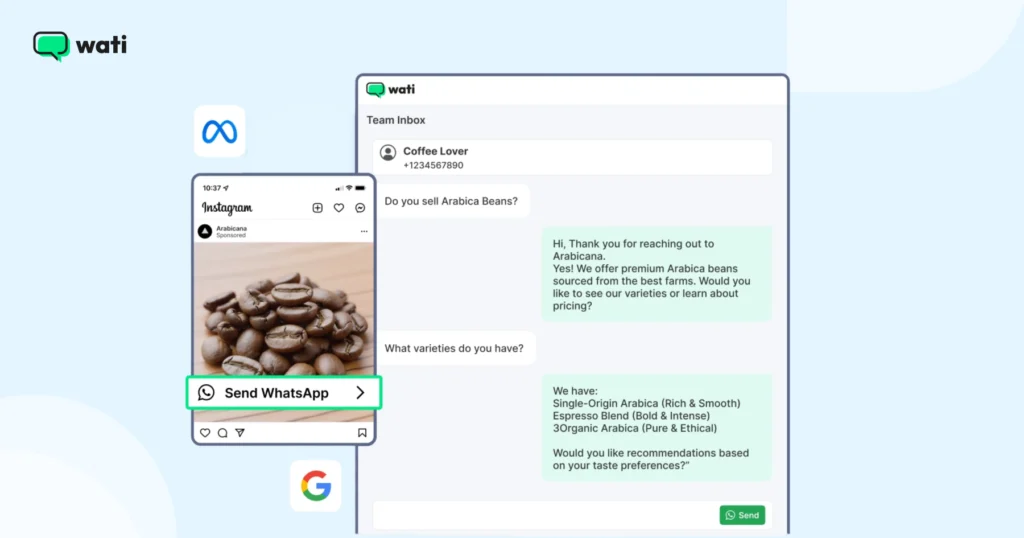
They support a wide range of business goals, from lead generation to sales and ongoing marketing engagement.
Meta isn't the only one using this format. Google has already made ads that click to WhatsApp, signaling that conversational ads are becoming a standard way for brands to engage customers.
Why Businesses Should Try Click-to-WhatsApp-Ads: Consumer-Focused Statistics
Customers are switching to modern forms of marketing these days. Instead of outbound calls, registrations, or emails, they now engage via messaging platforms to shop or make purchases.
Meta's 2026 State of Business Messaging report, a Kantar-run survey of 11,056 consumers across 22 global markets, found that 73.3% of consumers now prefer messaging when communicating with a business, a clear shift away from legacy channels like phone and email.
That preference translates directly into revenue: 72.4% of consumers say they're more likely to purchase from a brand that offers messaging as a contact option, and 74.6% say they trust a business more when they can exchange messages with it.
You can place click-to-WhatsApp ads across Instagram and Facebook, so that customer queries are attended to, whether it is booking a demo, checking delivery eligibility, or inquiring about warranty.
That responsiveness matters more than it might seem: 66.8% of consumers say they feel frustrated when messaging isn't offered as a contact option at all, and separately, 69% say waiting on hold is a waste of time, both signals that an instant WhatsApp chat removes a real point of friction that traditional lead forms and call centers don't.
With CTWA, you can also lean on automation without losing trust: 67.7% of consumers agree that getting a response from an AI chatbot is helpful, so a well-configured Wati chatbot that answers FAQs or qualifies a lead the moment they message isn't a compromise. It's what most customers already expect.
Note: By integrating CTWA into your sales and marketing strategy, you can trigger chatbots to qualify leads, collect relevant data, and even route them to the right sales reps based on their responses or intent.
CTWA vs. CTWP: Why Some "Free Window" Conversations Get Charged Anyway
This is one of the biggest sources of billing confusion, so it's worth understanding before you launch any campaigns.
A Click-to-WhatsApp ad (CTWA) is an ad created with the Messages objective and WhatsApp as the messaging destination. These conversations qualify for Meta's 72-hour free entry point window.
By contrast, what many providers call a Click-to-WhatsApp post (CTWP) is simply a boosted Facebook or Instagram post with a WhatsApp button that uses a different campaign objective, such as Engagement, Reach, or Traffic.
"CTWP" isn't an official Meta term, but it's commonly used to distinguish these campaigns from true Click-to-WhatsApp ads. Although both campaign types can include a WhatsApp button and be managed through Ads Manager, Meta treats them differently for billing.
What it is | Free 72-hour window? | |
CTWA (Click-to-WhatsApp ad) | Ad built with Messages objective, WhatsApp destination | Yes |
CTWP (Click-to-WhatsApp post) | Boosted post with a WhatsApp button, non-message objective | No, billed as a standard conversation |
- When a customer clicks a true CTWA ad, Meta includes a Click-to-WhatsApp Click ID (ctwa_clid) in the referral metadata, thereby qualifying the conversation for the free entry point window.
- Conversations that originate from boosted posts typically include source_type: "post" instead of a CTWA referral with ctwa_clid, making this one of the quickest ways to verify whether a conversation originated from a qualifying Click-to-WhatsApp ad.
To make sure your campaigns qualify, create ads with the Messages objective and WhatsApp as the destination, or direct users to the WhatsApp Message button on your Facebook or Instagram Page. Both entry points qualify for Meta's 72-hour free entry point window.
CTWA vs. Traditional Ad Formats: What Actually Changes
The primary difference between CTWA and lead form ads isn't where the user lands, but how many details they are asked to enter before they can get in touch.
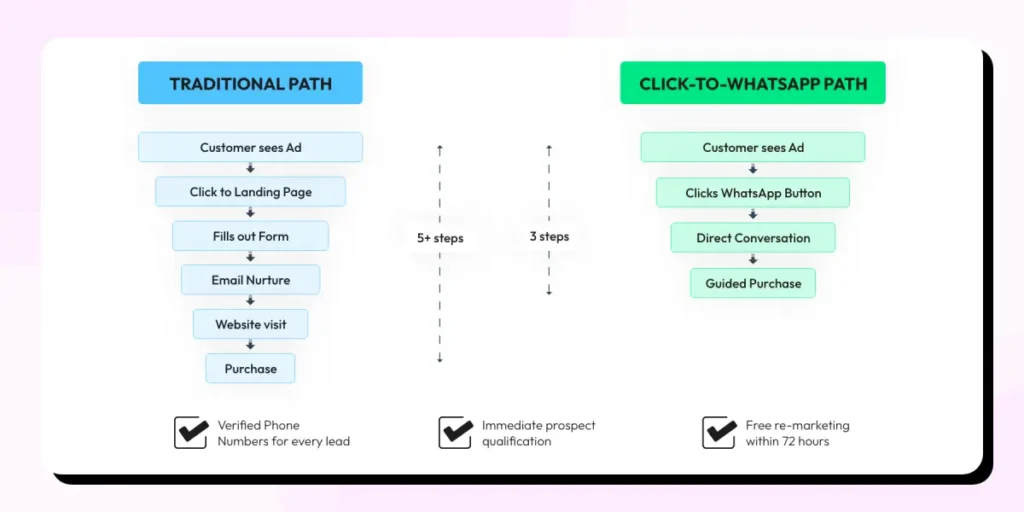
This really adds a lot of friction. Traditional ad formats mean switching from one platform to another, while CTWA keeps everything in a familiar interface.
Feature | Traditional Ads (Lead Forms/LP) | Click-to-WhatsApp Ads (CTWA) |
User Flow | Ads → Browser → Form → Wait for call or email | Ad → WhatsApp → Instant Chat |
Response Time | Hours or days (delayed follow-up) | Real-time (live agent or AI bot) |
Data Capture | Static fields (prone to fake info) | Verified phone number (automatic) |
Environment | External website (unfamiliar) | WhatsApp (daily habit) |
Retargeting | Dependent on cookies/pixels | Free 72-hour entry-point window, plus a 24-hour customer-service window for replies |
Why CTWA Campaigns Outperform Traditional Ads: 5 Reasons
What makes WhatsApp ads or WhatsApp advertising special? Let’s look at some of the benefits.
1. Faster Engagement and Higher Conversions
WhatsApp is already a familiar space. When customers can talk to your team directly, they stay engaged and move faster through the buying process.
Example: A boutique skincare brand runs an Instagram ad. A customer taps “Send WhatsApp Message” and asks, “Will this moisturizer suit oily skin?” The team replies instantly with a quick recommendation and a before-and-after photo. Within three minutes, the customer says, “Okay, send me the link. I'll order now.”
2. Better Customer Support and Actionable Insights
Real-time chats help you provide customer support by quickly answering FAQs, resolving issues, and collecting feedback. WhatsApp also gives you data on delivery and engagement, so you can track performance and improve future campaigns.
Example: A customer messages an electronics store about disconnecting earbuds; support sends a troubleshooting video and resolves it on the spot.
Reviewing WhatsApp analytics later reveals that support queries spike after every product launch, an insight that leads the team to create a proactive pre-launch broadcast, cutting support tickets significantly.
3. Campaign Flexibility Across Goals
CTWA isn't a one-trick channel. You can use it for product launches, seasonal promotions, post-purchase follow-ups, and customer feedback, all within the same platform.
Meta's 72-hour free entry point (FEP) window means that once a customer initiates a chat, you can follow up multiple times within that window without incurring extra messaging costs. This makes it especially powerful for re-engaging warm leads and running time-sensitive offers.
Example: A fashion retailer runs a WhatsApp ad that opens with “Want early access to our new year collection?” Customers reply “Yes” and instantly receive a personalized lookbook, a 10% early-bird discount code, and a tap-to-pay checkout link.
The same brand uses the same channel the following month to collect NPS scores. Same platform, completely different goal, both equally effective.
4. Target CTWA Ads by Funnel Stage
The strongest CTWA campaigns segment audiences by where they sit in the funnel rather than running one broad ad set. A simple structure to start from:
- Awareness: Broad targeting plus interest stacks, used to seed Meta's algorithm learning.
- Consideration: Website or video viewers who engaged but haven't messaged yet — retarget with a benefit-led CTA.
- Purchase intent: Cart abandoners and product-page viewers get a fresh, urgency-based CTA into WhatsApp.
- Retention/expansion: Build lookalike audiences from past buyers, high-LTV customers, and WhatsApp chat initiators. Exclude recent converters to avoid paying to re-target recent buyers.
Consent matters here too: Only continue messaging a contact who has given an opt-in tied to their phone number, honor opt-outs across every system you use, and match each follow-up template's category to what the customer actually consented to.
Getting this wrong doesn't just risk compliance issues. It also degrades WhatsApp's own quality rating for your number.
5. Clearer Reporting
Using Wati's Conversions API (CAPI) integration, you can see how chats move toward leads or purchases.
Connect your Facebook Ads account to Wati and track metrics like cost per conversation, cost per lead, and cost per purchase, giving you a clear picture of ad-attributed revenue.
Here is an explanation of how analytics works: if a D2C coffee brand sets up Meta Pixel + Conversions API and runs a WhatsApp ad saying “Find your perfect coffee in 30 seconds.
Chat with us,” reporting reveals 1,200 people clicked, 800 opened WhatsApp, 430 completed the recommendation, and 200 made a purchase. Suddenly, the marketing team can answer the CEO's favorite question: “Which campaign actually made us money?”
What Do You Need To Set Up Click-to-WhatsApp Ads?
If you wish to run WhatsApp campaigns using the Facebook Ads Manager, here are the things you need to set up, per Meta.
1. Get a WhatsApp Business Account
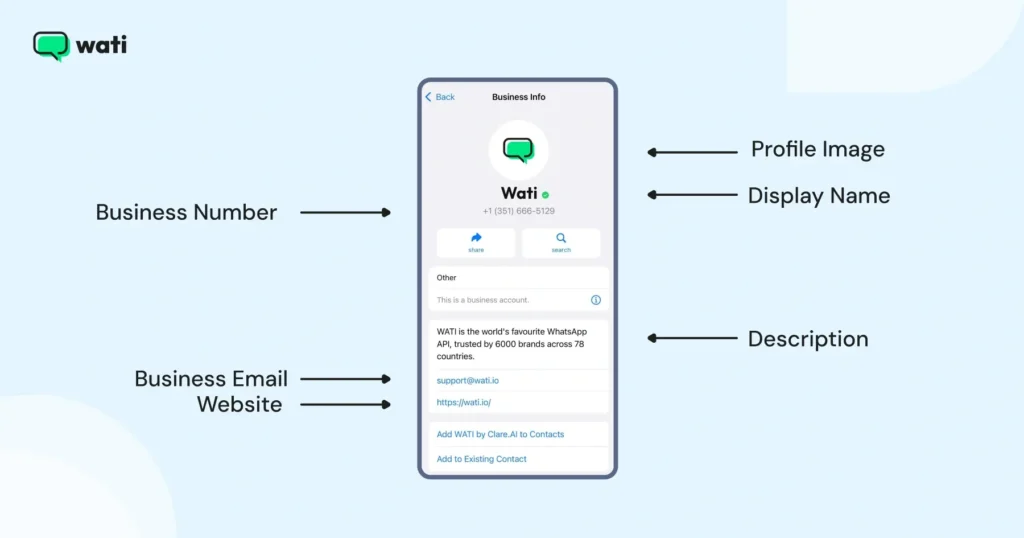
- CTWA is not supported on personal WhatsApp numbers. You need a WhatsApp Business account connected via the WhatsApp Business Platform (API) to assign agents, send messages, and track conversions.
- Make sure your WhatsApp Business account, Facebook page, and Meta Business Manager are connected under the same account.
- Once connected through Wati, this integration does more than just route ad clicks on WhatsApp.
- In Wati, every CTWA conversation is automatically tagged with a CTWA label, giving you visibility into which campaign the lead came from.
- When a lead takes a meaningful action, like confirming an appointment or completing a purchase, Wati sends the conversion data back to Meta via the Conversions API (CAPI), helping Meta optimize delivery metrics like cost-per-lead (CPL) or cost-per-purchase (CPP).
This helps you export “qualified leads” that initiated a meaningful action in a CTWA conversation.
2. Add WhatsApp Business Number to Your Facebook Page
- Navigate to your Facebook Business Page.
- Click Settings. In the left column, click WhatsApp.
- Choose your country code and enter your WhatsApp number.
- Click Send code, then enter the OTP and confirm.
How to Create Click-to-WhatsApp Ads in Meta Ads Manager?
Before you start creating CTWA in Meta Ads Manager, ensure your WhatsApp Business number and Facebook Page are linked under the same Meta Business Manager account.
If numbers don't match, either your ads won't work, or they won't be tracked correctly in Wati. Also have basic familiarity with Facebook Advertising and paid campaign creation.
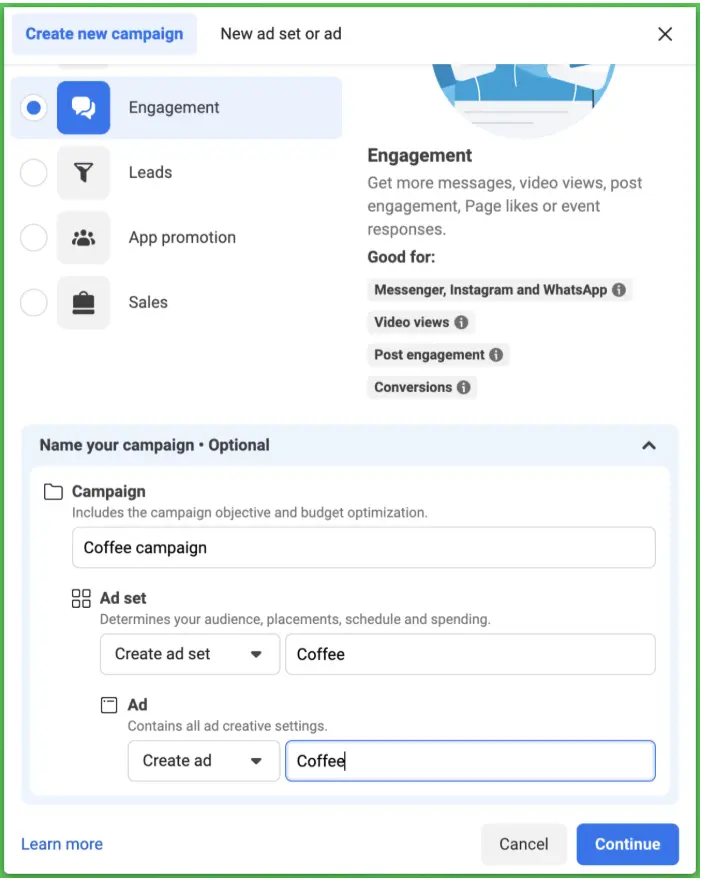
1. Start With the Campaign Objective
In Meta Ads Manager, create a new campaign and choose “Engagement” as the campaign objective.
A campaign objective routes clicks directly into WhatsApp, Facebook, or Instagram. Choosing something like “traffic” or “leads” will break the whole flow.
2. Set a Budget Criteria
Choose a “daily” or a “lifetime” budget for your campaign. For a fixed campaign (like a product launch or seasonal sale), set a “lifetime budget” so Meta can adjust cost toward ads that show more engagement.
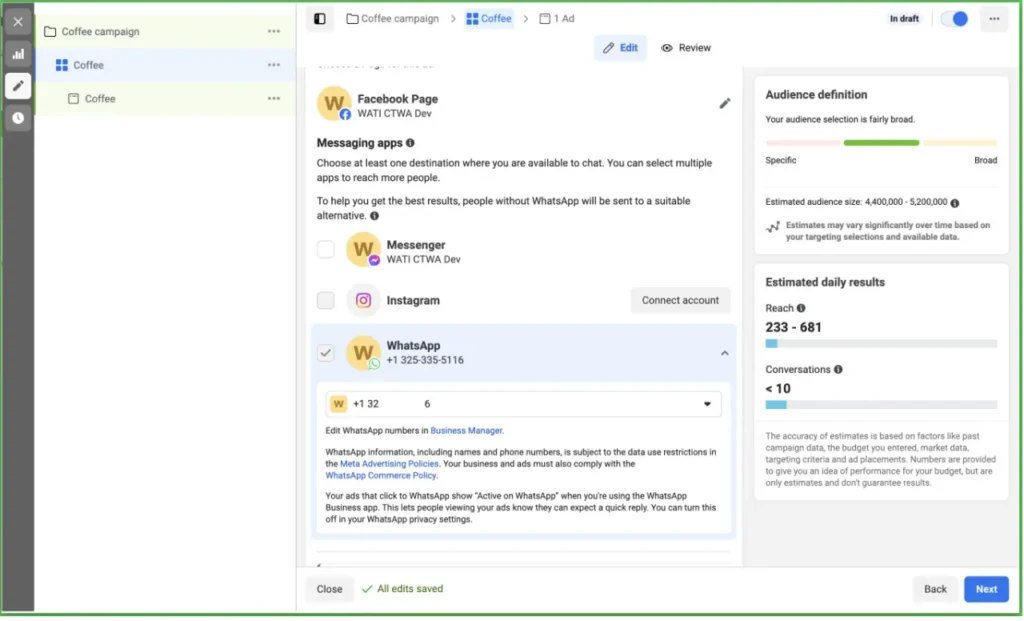
3. Route the Ad to WhatsApp, Not a Website
Direct CTWA ads to messaging apps, not back to the website. Click Continue, move to “Ad group,” select “Messaging Apps,” and choose “WhatsApp.”
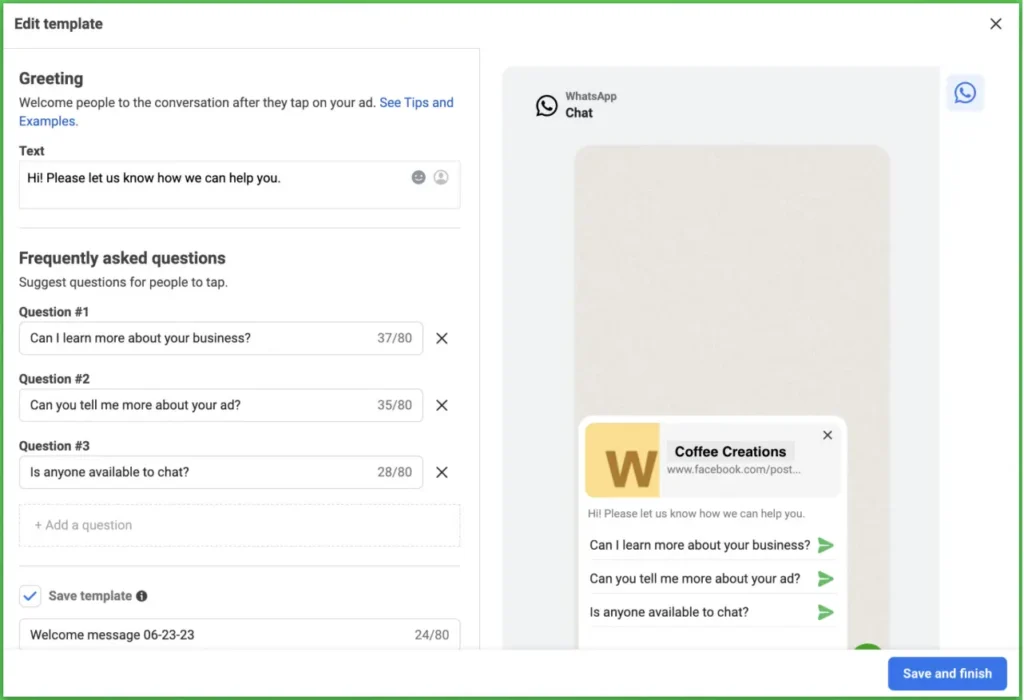
4. Design Your Ad
Design your ad banner, CTA, and copy inside the Facebook Ads Manager. Add a greeting message such as “Hey, saw your inquiry online. Please let us know how we can help you,” and add reply prompts like “Get a Quote” or “See Product Details.”
5. Publish and Handover To WhatsApp
Click “Publish” and send your ad for review. Once Meta approves it, every conversation it generates gets stored in your Wati team inbox under the “CTWA” tag.
How to Identify CTWA Conversations?
- Look for the CTWA notification badge next to conversations in the chat listing.
- Use the CTWA filter to segment and view only ad-driven contacts.
- Check the “source ID” and “source URL” contact attributes. These only appear for CTWA contacts.
- A true CTWA conversation will also carry a ctwa_clid and source_type: "ad" in the webhook payload; a boosted-post conversation (CTWP) will show source_type: "post" instead.
How to Track Your Click-To-WhatsApp Campaign Outcomes with Wati?
Once the connection is live and you're running CTWA campaigns, Wati lets you track two things that matter:
- Purchases
- Qualified leads, through approved templates for each metric used in the WhatsApp flow.
When a pre-approved template confirming a booking or transaction is sent, Wati records this as a conversion and sends it back to Meta via CAPI, so your ad manager reflects real results.
From Wati's dashboard, you can directly see CTWA performance metrics like cost per lead, cost per conversation started, return on ad spend, and cost per purchase.
The one gap this doesn't solve is when leads go silent after the first message.
Wati generates “auto-follow-ups”, up to three follow-up messages at intervals you set, using templates of your choice, with no manual effort.
Beyond auto follow-ups, you can also set up a chatbot in Wati to engage leads the moment they message you: answering product queries, sharing details, and qualifying intent without any manual effort.
Retargeting CTWA Leads at Zero Cost: 1-Click Re-Broadcast
Once your CTWA inbox has a list of qualified leads, the highest-ROI next move is re-engaging them with a restock alert, a new flavor or SKU launch, or a limited-time discount code, without exporting anyone to a spreadsheet.
Wati's CTWA insights page lets you select a qualified lead cohort from a specific ad and send a targeted broadcast to it directly, in one click, instead of manually filtering contacts or rebuilding a list from a CSV export.
Because you're messaging a warm, ad-qualified cohort in the same WhatsApp thread the ad opened, cost per acquisition drops and conversion likelihood rises, and if you send within the 72-hour free entry-point window, the re-marketing broadcast itself costs nothing in messaging fees.
How Does the CTWA Messaging Limit Work? (+ How to Not Waste It)
Say a user initiated a chat by clicking a WhatsApp Click-to-Ad or an Instagram link at 2 AM. After a customer texts, Meta immediately triggers a 24-hour customer service window.
Teams have to respond with a WhatsApp follow-up message within 24 hours to trigger a 72-hour Free Entry Point (FEP) window.
Wati sends an auto-follow-up (quick reply) or a chatbot reply to the prospect instantly. Within the 72-hour free window, you can send either formal WhatsApp templates or informal messages to the prospect.
In case, due to any systemic issue, you couldn't send a WhatsApp follow-up within 24 hours, Meta still allows you to send WhatsApp templates for the next 72 hours, free of charge.
After 72 hours, you are charged on a “message-category” basis. Learn more about WhatsApp API pricing to understand message categories in detail.
What Changes on October 1, 2026: Meta's New Service-Message Charge
Meta has confirmed, in its own pricing documentation, that from October 1, 2026, it will begin charging for "service messages," the free-form, non-template replies you currently send inside the 24-hour customer-service window, at the same per-message rate it already charges for utility and authentication templates in that market.
Read the detailed pricing changes here,
In short,
- What this does not change: The 72-hour free entry-point window created by a genuine CTWA ad is untouched. Meta's documentation confirms that marketing, utility, authentication, and service messages sent within that window all remain free for delivery, exactly as described above.
- What it does change: Once you're inside the 24-hour customer-service window (outside the 72-hour free window) and replying with a normal, non-template message (the kind a live agent or a chatbot sends when just answering a question) or a utility template confirming an order, that message becomes billable after October 1, 2026, at the market's utility/authentication rate.
Practical takeaway for CTWA campaigns:
- The cost of the first ad-driven conversation doesn't change, nor does the free window the ad opens.
- But every open-ended back-and-forth your agents or chatbot have with a lead once that free window has closed, previously free inside the 24-hour service window, will start carrying a small per-message cost. Two adjustments are worth planning now:
- You can try to manage by consolidating multi-part replies into a single, complete message, or use structured flows (e.g., WhatsApp Flows) to capture several pieces of information at once, instead of a long back-and-forth of short service messages.
- Route confirmed, high-value actions through approved templates sent within the free window (which is already the pattern this guide recommends for conversion tracking) rather than free-form replies once that window has closed, so cost stays predictable and tied to actual conversions.
For exact per-message rates once published, see Meta's rate cards and volume tiers (Meta commits to publishing October 2026 rates by September 1, 2026).
Best Practices For High-Impact Click to WhatsApp Ad Campaigns
When your message matches their interests, engagement naturally increases. Strong messaging also grabs attention and encourages users to start a chat with your business.
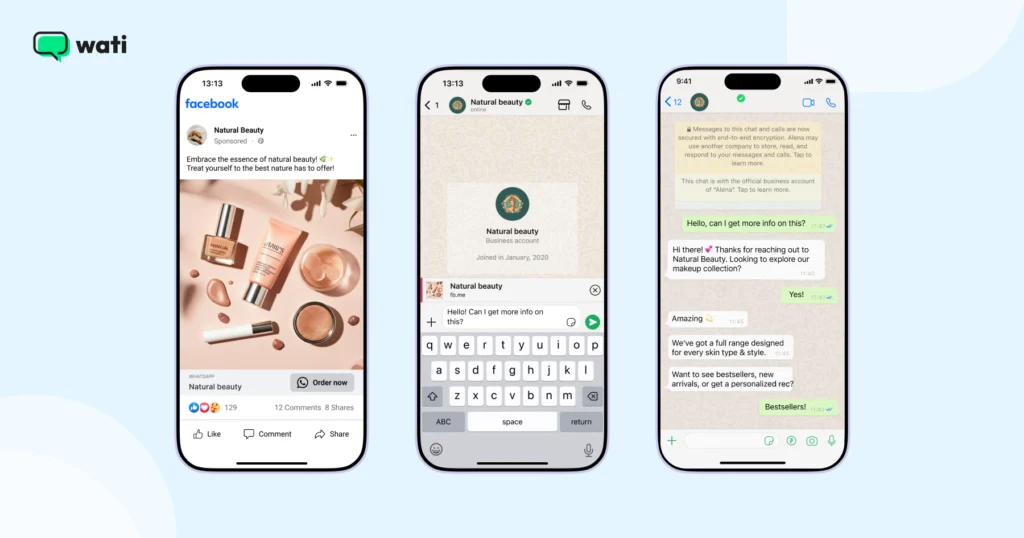
- Write copy that connects. Great CTWA copy doesn't feel like an ad; it feels like a message meant for the person reading it.
- Keep your CTA simple. Use short, clear phrases: “Send a message,” “Get a quote,” or “Book now.” Test a few options and stick with what drives the most conversations.
- Know your audience. Address the specific concerns of the person you're targeting. Use language they'd use themselves.
- Use chatbots to qualify leads at scale. Set up your chatbot to ask qualifying questions the moment someone starts a conversation; trigger a pre-approved template message if they meet your criteria. This also signals a conversion back to Meta via CAPI.
- Respond within 24 hours. This is the key to unlocking the 72-hour free messaging window. Build processes (or automation) that ensure no CTWA lead sits unanswered.
- Don't track every chat as a lead. Only count template messages that confirm real actions: demos booked, consultations scheduled, orders confirmed.
- Keep consent and templates matched. Only continue messaging contacts who gave an explicit opt-in tied to their number, honor opt-outs everywhere, and use the template category that matches what they consented to. This protects both compliance and your number's quality rating.
Bonus read: 21 Click-to-WhatsApp Ad Examples Designed to Drive Conversions (2026)
Key Mistakes That Can Hurt Your CTWA Campaign
A few small WhatsApp marketing mistakes can hurt the performance of your Click-to-WhatsApp campaigns. Here are some mistakes to watch out for.
Mistake | Why it hurts |
Using generic templates and replies | Conversations fall flat when every message looks automated. Balance speed templates with replies that feel genuine. |
Long customer response times after engagement | Customers expect fast replies on WhatsApp; late replies mean missed opportunities when someone is ready to decide. |
Missing the 72-hour follow-up window | For CTWA, you have a limited window to follow up at no extra cost. Miss it, and high-intent leads slip away. |
Make a habit of reviewing the above details before and after each campaign. It can save your budget and help you convert more of your conversations.
Which are the Best Industries for Click to WhatsApp Ads?
CTWA ad processes work well in sectors where customers prefer quick answers and guidance before making a decision.
1. E-Commerce & D2C Brands
Online shoppers have questions about a product's size, delivery timeline, and more. A CTWA ad lets them connect with support and get their query answered instead of abandoning their cart.
2. Real Estate
High-value decision-makers want many details and photos before scheduling a visit. A CTWA ad can let interested people request a PDF with property details before booking a site visit.
3. Education and Edtech
CTWA eliminates multiple sign-up hassles by helping prospects inquire faster about courses on WhatsApp. A bot or counselor provides a syllabus PDF and answers FAQs in real time instead of a long landing-page form.su
4. Healthcare and Wellness
Healthcare brands can cater to immediate inquiries or offer 1:1 consultation details via CTWA. WhatsApp's end-to-end encryption and data compliance make a direct chat feel more confidential and supportive than a public comment section.
5. Travel and Hospitality
Travel agencies can forward customized booking details or itineraries to a customer who engages with a country-specific campaign, enabling consultative selling through dialogue rather than a static hotel listing.
Famous Click-to-WhatsApp Ad Campaigns That Delivered Results
Keep reading to see some click-to-WhatsApp ads stories that delivered results.
1. Habuild
Habuild was losing high-intent leads to incorrect phone numbers and sign-up form drop-offs.
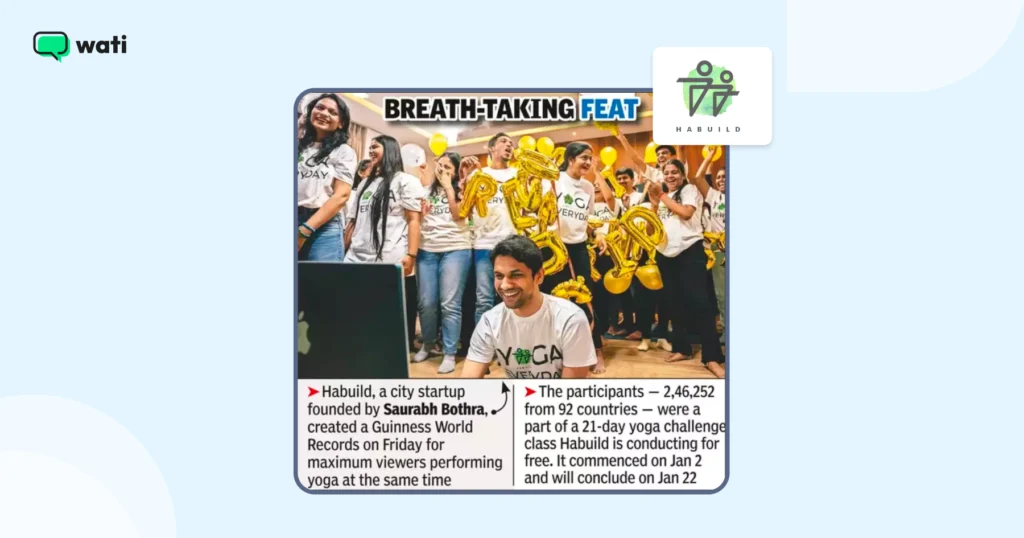
Switching to Click-to-WhatsApp Ads verified phone numbers instantly, cut that friction, and bringing customer acquisition cost down to one-fifth of what it was, helping Habuild grow from 400 customers to over 1 million paid members today. Want to see how they did it?
2. Bowaba
Bowaba used Click to WhatsApp Ads to transform how brands in the GCC connect with customers. With Wati, Bowaba built WhatsApp-first funnels where users could chat directly with a business instead of filling out forms.
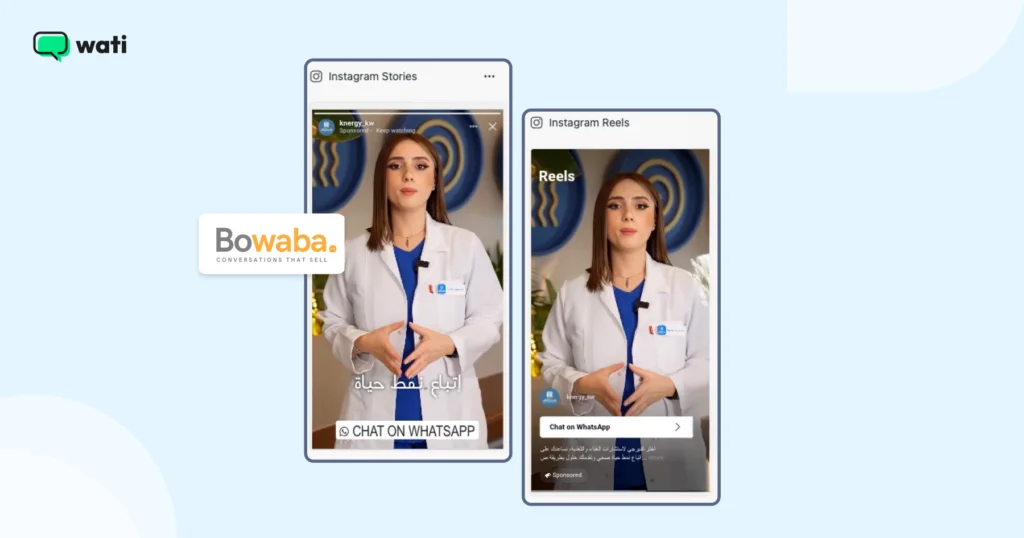
By integrating WhatsApp with CRM tools and using real-time remarketing within WhatsApp's 72-hour window, Bowaba's clients achieved up to 11x ROAS, higher conversion rates, and stronger customer relationships. Want to see how they achieved it? Read the full case study.
3. Blacklyf
Blacklyf turned skeptical online shoppers into paying customers using Click to WhatsApp Ads. In Uganda, where most people distrust e-commerce websites, driving traffic to a landing page wasn't working.
By switching to WhatsApp-first campaigns, Blacklyf made it easy for potential buyers to chat directly with their team instead of clicking “Buy” on a website they didn't trust.
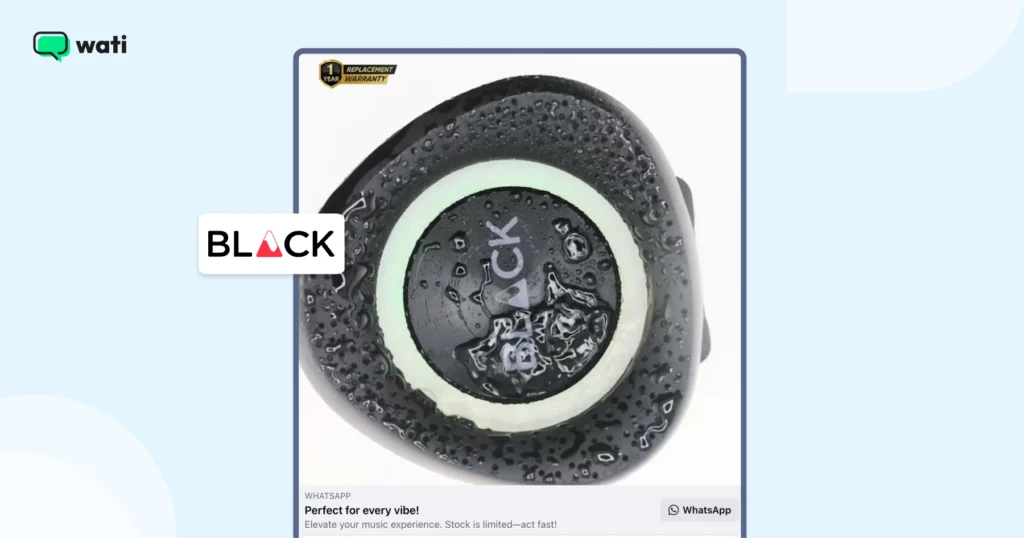
Smart retargeting within WhatsApp's 72-hour window helped recover lost leads and convert hesitant buyers through quick follow-ups and time-sensitive offers. The results: 60% lower acquisition costs, a 3x higher conversion rate, and a growing base of verified customers ready for remarketing. Want the full story? Read the complete case study.
Ready to Turn Clicks Into Conversations?
It's important not just to set up a CTWA, but also to follow it through to see if it proved fruitful for you. Click to WhatsApp Ads enable you to converse instantly, reducing customer friction and initiating high-quality conversations.
With the right setup and tracking, you can see exactly what's working and improve every campaign outcome drastically.
Book a demo with Wati and see how WhatsApp conversations can turn ad clicks into real customers.
Frequently asked questions
What are Click to WhatsApp Ads?
Click to WhatsApp Ads are ads that open a WhatsApp chat when clicked. Instead of leading users to a website or form, they start a direct conversation with your business.
How do Click to WhatsApp Ads work?
When someone clicks the ad, they're taken straight to a chat with your business on WhatsApp. You can use this space to answer questions, share product details, or guide them toward a purchase.
What do I need to run Click to WhatsApp Ads?
You'll need a WhatsApp Business Account, a linked Facebook Page, and access to Meta Ads Manager. A verified WhatsApp number must also be connected to your Page.
Can I run these ads with a regular WhatsApp number?
No. You must use a WhatsApp Business Account or WhatsApp Business API account to run Click to WhatsApp Ads.
How can I track conversions from my Click to WhatsApp Ads?
You can connect Wati to your Facebook Ads Account to track conversations, purchases, and qualified leads directly from your campaigns.
What is the 72-hour free messaging window?
When a customer messages you from a Click to WhatsApp Ad, you can reply with templates within 72 hours without incurring template charges.
How can I improve performance for my Click to WhatsApp Ads?
Focus on clear ad copy, a simple call to action, funnel-stage-appropriate targeting, and quick replies. Review metrics like cost per conversation and cost per lead to refine your campaigns.
Can I automate my WhatsApp conversations?
Yes. Platforms like Wati let you set up chatbots, automated replies, and workflows to manage leads, share product details, and follow up with customers.
What's the difference between CTWA and CTWP?
A CTWA (Click-to-WhatsApp ad) is built with the Messages objective and qualifies for the 72-hour free entry-point window. A CTWP (Click-to-WhatsApp post) is a boosted post using a different objective (like Engagement) that also shows a WhatsApp button, but it does not qualify for the free window and is billed as a standard conversation.
Will Click-to-WhatsApp conversations still be free after October 2026?
The 72-hour free entry-point window itself is unaffected. What changes on October 1, 2026, is that free-form “service messages” sent inside the 24-hour customer-service window, previously free, become billable at the local utility/authentication rate. Template messages sent within the 72-hour window remain free.
Related posts
- 40 Festival Templates for WhatsApp: Diwali, Holi, Eid, Christmas & More
Discover 40 ready-to-use Indian festival templates for WhatsApp. Customize and send festive wishes, sale announcements, and offers in minutes.
- Why Isn’t Instagram Engagement Converting into Leads? (And How to Fix it)
learn what are the ways to optimize instagram engagement and how to turn public comments and private DMs into leads to improve your sales pipeline and conversions.
- Shared Team Inbox for Instagram: A Buyer’s Checklist for 2026
Use this fastest checklist to evaluate any shared team inbox for Instagram, which covers DMs, comments, automation, and multi-channel support.
- Instagram Comment Automation: Never Miss a Lead in Your Comments Again
Learn how Instagram comment automation works, the best use cases for teams, and how to set up comment-to-DM flows that capture leads and convert.